Creative Design Studio for Young Artists
Reviews
Creative Design Studio for Young Artists stands out for its focus on relaxation and personal expression. The pattern library offers enough variety to keep sessions fresh, while the color palette encourages experimentation. Applying designs to characters gives a satisfying sense of completion. The photo upload feature is a clever addition that bridges virtual art with real-world application. Sharing options are well-integrated and safe for younger users. The absence of timers or scores removes pressure, making it a great choice for unwinding. Overall, it is a well-crafted tool for budding artists who want a stress-free creative outlet.
Description
Designing with Color and Pattern
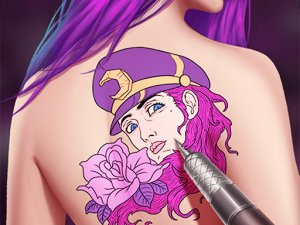
Creative Design Studio for Young Artists centers on the joy of combining colors and shapes. Players select from a library of patterns, ranging from simple outlines to more elaborate motifs. The color palette provides numerous shades, allowing for precise customization. Each design can be filled with care, encouraging attention to detail and personal expression. The process is straightforward: choose a pattern, pick your colors, and apply them to create a finished piece. There is no time pressure, making it suitable for those who prefer a calm, unhurried creative session.
Applying Art to Characters
Once a design is complete, it can be placed onto a character model. This step transforms a flat pattern into a wearable decoration, giving a sense of how the artwork might look in a more lifelike context. The game includes several character options, each with a distinct style. Applying the design is a simple drag-and-drop action, and adjustments can be made to ensure a good fit. This feature adds a layer of satisfaction, as players see their creations come to life on a virtual figure.
Photo Upload for Realistic Previews
An interesting addition is the ability to upload a personal photograph. After selecting a design, it can be overlaid onto the uploaded image. The size and position can be adjusted to match the photo. This gives a realistic preview of how the pattern might appear in a real-world setting, such as on clothing or accessories. It is a practical tool for those who want to experiment with styles before committing to a physical project.
Sharing and Community Feedback
Finished artwork can be saved and shared with others. The game includes options to send creations to friends or post them within a community gallery. Receiving feedback from peers can be motivating and help refine artistic choices. This social aspect encourages regular practice and experimentation, as players see what others have made and exchange ideas. The sharing process is designed to be safe and simple, with no personal information required.
Accessible for All Ages
The interface is built with clarity in mind. Buttons are clearly labeled, and the navigation is intuitive. This makes the game approachable for younger players while still offering enough depth for older users. There are no complex menus or steep learning curves. The focus remains on creativity and relaxation, not on mastering difficult mechanics. This design philosophy ensures that anyone can pick up the game and start designing within minutes.
Compatibility
Faq
What age group is Creative Design Studio for Young Artists suitable for?
Can I use my own photos in the game?
Are there any in-app purchases or ads?
How do I share my artwork with friends?
Is there a time limit or scoring system?
Can I play this game offline?
Other Similar Games

Dig Discovery Puzzle Game
Bamboo Room 2 Escape Puzzle

Oregon Trail Strategy Adventure Game

Tammy Jo Creative Star Adventure

Ice Princess Wedding Planner

Creative Truck Coloring for Children

Donkey Art Color Fun for Children
Backyard Basketball Score Rally

Runaway Hen Pursuit Arcade