Tile Navigation Puzzle
Reviews
Tile Navigation Puzzle offers a refreshing take on the sliding block genre. The core mechanic of committing to a direction until hitting a wall creates tense, thoughtful moments. The gradual difficulty curve ensures newcomers are not overwhelmed, while the later boards provide a satisfying challenge for veterans. The inclusion of a robust level editor is a major highlight, enabling endless custom content. The clean visuals and responsive controls make for a polished experience. This is a solid choice for anyone who enjoys logic puzzles that require strategic thinking.
Description
Core Movement Concept
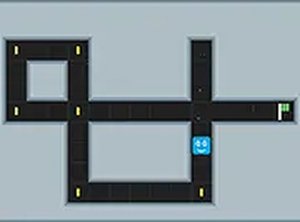
In Tile Navigation Puzzle, players control a marker that slides in a chosen direction until it meets a wall or reaches the target zone. This mechanic demands careful planning because you cannot stop mid-slide. Every decision sets the marker on a fixed path, so you must anticipate obstacles and plan several moves ahead. The simplicity of the control scheme contrasts with the depth of strategy required to solve later puzzles.
Level Design and Progression
The game presents a series of boards that grow in complexity. Early stages introduce basic layouts with few obstacles, allowing players to learn the sliding behavior. As you advance, boards incorporate more hazards and require longer sequences of moves. The difficulty curve is gradual, ensuring that new concepts are introduced at a comfortable pace. Each level feels like a self-contained brain teaser.
Collectibles and Hazards
Scattered across many boards are bonus items that increase your final score. These are placed in locations that force you to deviate from the most direct route to the goal. Balancing the desire for a high score with the risk of encountering a hazard adds a layer of decision-making. Hazards are obstacles that reset the level if touched, demanding that you memorize their positions and plan safe paths.
Custom Level Editor
A standout feature is the level editor, which allows players to design their own puzzles from scratch. You can place walls, goals, bonuses, and hazards on a grid to create unique challenges. Completed levels can be saved and shared with the community, extending the game's replay value significantly. This tool is intuitive enough for beginners but offers enough depth for experienced designers to craft intricate puzzles.
Visual and Audio Presentation
The game adopts a clean, minimalistic visual style that keeps the focus on the puzzle itself. Bright colors distinguish different elements, making the board easy to read at a glance. Sound effects provide subtle feedback for successful moves and collection of bonuses, without being distracting. The interface is uncluttered, with all controls clearly labeled.
Desktop-Focused Controls
Tile Navigation Puzzle is designed exclusively for desktop play. Keyboard arrow keys or mouse clicks provide precise input, which is essential for the game's mechanics. A full-screen mode is available to eliminate distractions. The responsive controls ensure that every move is executed exactly as intended, which is critical for solving complex puzzles.