Sprunki Color Art - Family Drawing Game
Reviews
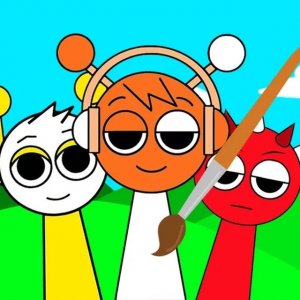
Sprunki Color Art is a wonderful free online coloring game for children. It offers a variety of musician characters to color, with adjustable markers and an eraser. The controls are simple, making it perfect for young kids. Saving and printing artwork is easy, and it works on all devices. A great tool for family creativity.
Description
Game Introduction
Sprunki Color Art is a cheerful online drawing activity designed for children and their families. The game presents a gallery of musician characters, each with a unique look, ready to be decorated with color. Players select a character and use a variety of digital markers to fill in the outlines. The core goal is to express creativity by choosing colors and applying them to different areas of the picture. This game stands out because it offers a simple, no-pressure environment where young users can explore art without needing physical supplies. It is built to work smoothly on computers, tablets, and phones, making it easy to play anywhere. Released in late 2024, it is rated for ages three and older, ensuring a safe experience for all. The game requires no downloads or installations, so it starts instantly in a web browser. Families can enjoy this activity together, encouraging artistic exploration and fine motor skill development.
How to Play
To begin, a player picks a musician character from the available selection. Clicking on the character opens a larger version on a new screen. On the right side, a set of colored markers is displayed. The player clicks a marker to choose a color, then clicks on the area of the picture they wish to fill. The marker tip can be made thicker or thinner using a control on the left side, which helps with both large sections and tiny details. If a mistake happens, an eraser tool removes unwanted color. After finishing, the artwork can be saved to the device or printed using the icons at the bottom. The entire game is controlled with a mouse or touch input, making it straightforward for young children to use independently.
Game Features
This game includes a wide palette of colored markers for creative choices. The marker tip can be adjusted to different sizes, allowing for broad fills or precise details. An eraser tool is available to correct errors without restarting. Players can save their finished pictures to keep a digital copy or print them for physical display. The game works on various devices, including desktop computers, laptops, tablets, and smartphones, through a web browser. It supports full-screen mode for an immersive experience. The content is rated for ages three and older, making it suitable for family use. No downloads or installations are needed, and the game runs on HTML5 technology.
Tips for Success
Encourage trying different color combinations to make each character unique. Start with larger areas using a thicker marker tip, then switch to a thinner tip for small details. If a mistake occurs, the eraser tool allows easy correction. Saving artwork periodically prevents loss of progress. Printing finished pieces can create a sense of accomplishment and provide physical keepsakes. Most importantly, let creativity flow freely without worrying about perfection.
Compatibility
Faq
Is Sprunki Color Art free to play?
Can I use Sprunki Color Art on a mobile phone?
Does Sprunki Color Art have any in-app purchases?
How do I save my artwork in Sprunki Color Art?
Is there a time limit in Sprunki Color Art?
Can I print my artwork from Sprunki Color Art?
Other Similar Games

Tiny Pickles Arcade Challenge

Eclair Quest Puzzle Journey
Dig Discovery Puzzle Game
Bamboo Room 2 Escape Puzzle

Oregon Trail Strategy Adventure Game

Animal Art Studio: Kids Drawing Game

Creative Truck Coloring for Children

Donkey Art Color Fun for Children

Backyard Basketball Score Rally